
An AI desktop companion who lives on your wallpaper
Sei is an AI gaming companion app where you shape the companion: their personality, voice and look are yours to set. With WorldLink, that companion can also live on your desktop. They move into a small anime-style room that becomes your wallpaper, sitting behind your icons. You decorate the room together, add a clock or the date in the font and colour you like, and they look around, wander off and come back. Click them for a reaction, or double click to open your chat. If you were looking for an AI desktop pet that talks to you, this is close, except your companion lives inside the wallpaper instead of walking over your windows. Sei runs on Mac and Windows.
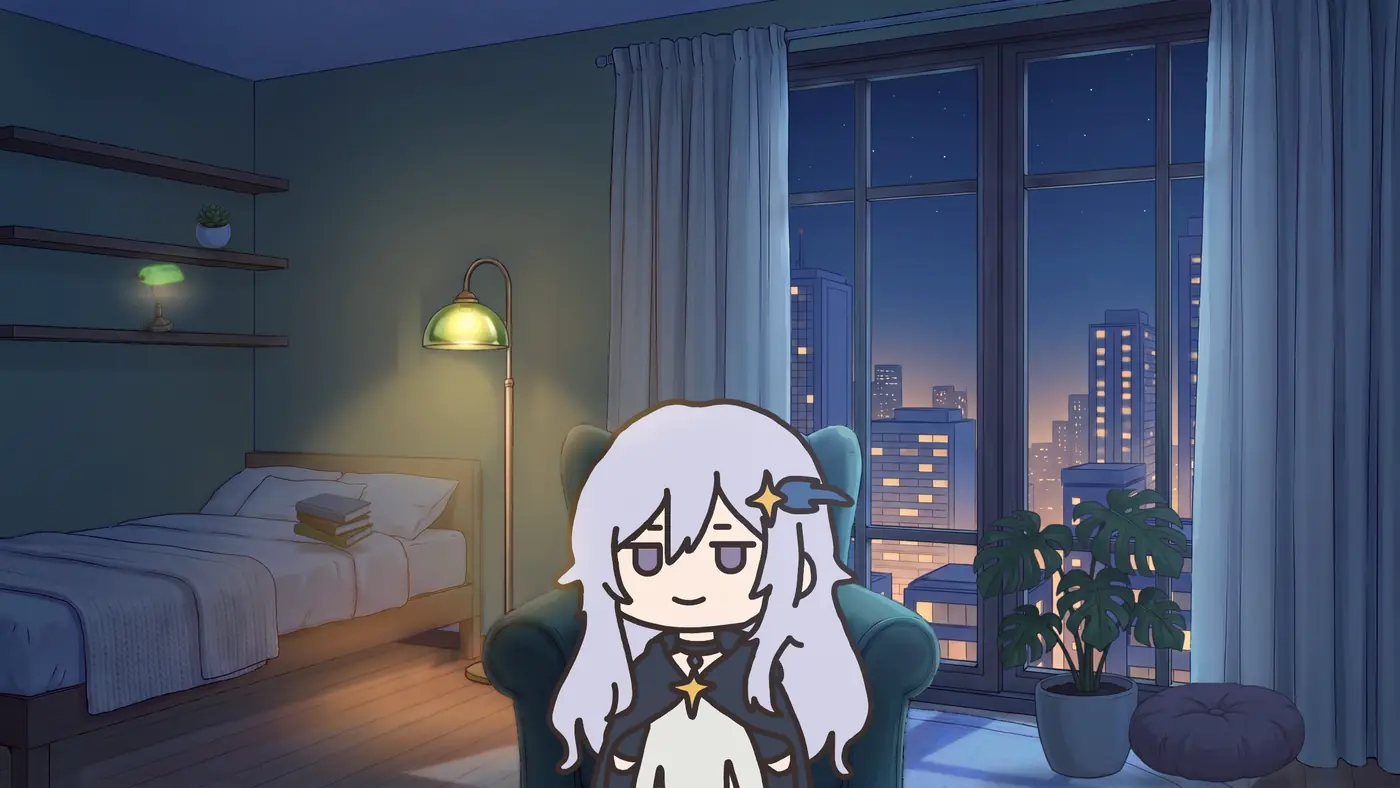
What an AI desktop companion is in Sei: WorldLink
Most desktop companions are a character in a see-through window that floats on top of your other windows. Sei's WorldLink does it differently. Your companion's room is the wallpaper itself, drawn behind your desktop icons, so it never covers what you are working on. You see them when you look at your desktop, and you click them when you want them.
It is the same companion you play with. Sei is a platform for AI gaming companions: each one has their own personality, voice and look, which you edit right in their tabs, and they join Minecraft, Stardew Valley, and Don't Starve Together as a player, play chess and Draw! with you, or watch any other game with Backseat. When you close the game, they go home to their room on your desktop.
What your companion does on your desktop
- Idles like they live there. They breathe, sway, blink and shift in their seat. Every so often, about once every 15 minutes, they get up, walk out of the room for a little while and come back.
- Follows your clock. On Auto, the room goes from day to dusk to night with your computer's time, fading slowly over about half an hour. You can also pin it to day, dusk or night.
- Looks around. Their eyes move smoothly from one thing to the next, they glance around the room, and they follow your cursor when you move it. They stand big on your desktop, about two thirds of the screen tall.
- Reacts when you click. Click them and they react, sometimes with a short line in a speech bubble. Double click them and Sei opens your chat with them.
- Says the odd thing on their own. Now and then, at most twice an hour, they say an idle line in a bubble. Never while a window covers the desktop, while you are in a game or on a call, or when you have stepped away. A mute button on the dock, or the Idle lines setting on their profile page, turns them off.
- Knows where they are. In your chats and voice calls they know they are in their room and what time of day it is there. They can also take a look at the room: they get a picture of it and a list of what is in it, so they can talk about the rug you just put down.
- Notices when you change their room. After you edit the room, they say a line about what changed. If you are on a call, they bring it up there instead.
- Keeps your chat tidy. Lines they say on the desktop, after a click or on their own, show in a bubble there and do not fill up your chat with them.
- Tells you when your desktop changed. When they move in or you save the room, a short line in Sei says your desktop was updated, with a Hide windows button that clears your other windows out of the way.
Three rooms, from day to night
Your companion first moves in on a plain background, and you pick their room in the guided setup, or later under Room in the editor. There are three: a cozy bedroom, a gamer room with LED strip lights, and a forest campsite with a campfire. Each has its own art for day, dusk and night.
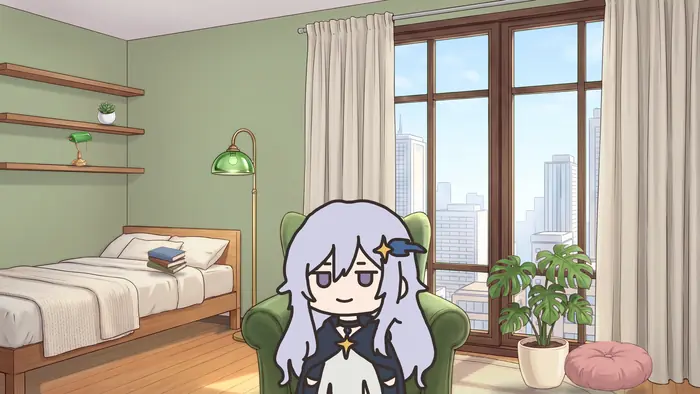
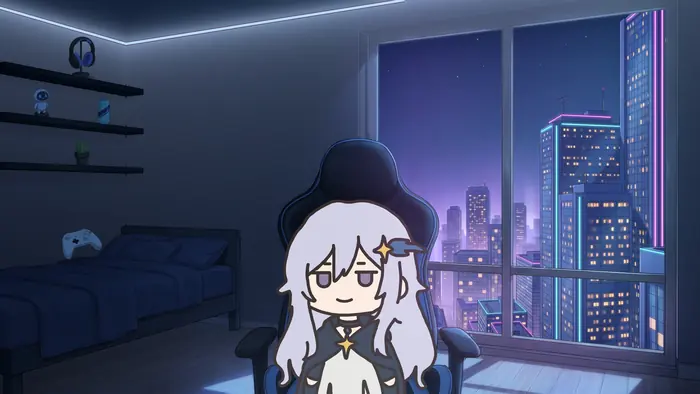
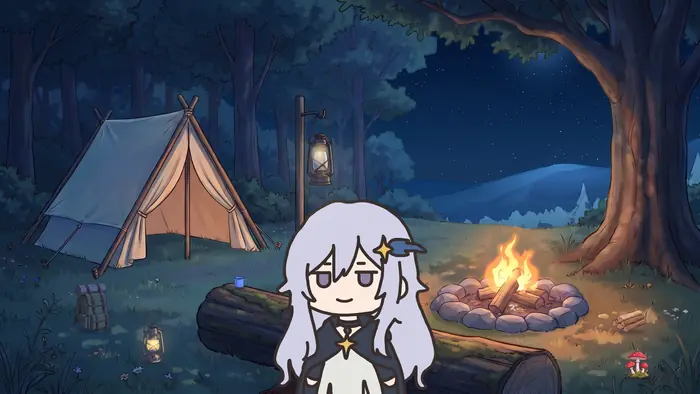
Decorate the room
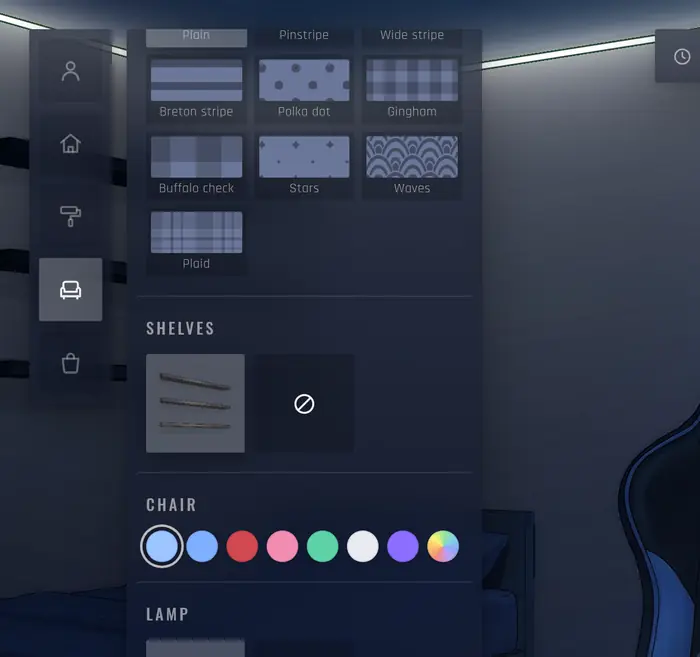
Press the brush on the dock, or Edit room on their profile page, and the editor opens on your desktop over the room in see-through panels. Drag things into the room and they settle onto the floor, a shelf or the wall. Then make it yours:
- Recolour things such as the chair, the lamp or the bedding from a palette.
- Add patterns to the walls, curtains, bedding, rugs, cushions or the tent, such as stripes, gingham, plaid, polka dots or stars.
- Change the curtains in the cozy bedroom.
- Pick the view out of the window: a city skyline, a forest valley, a seaside town or a neon city, each with its own day, dusk and night.
- Change the lamps and LEDs. The gamer room's LED strips take any colour, or slowly cycle through them. At the campsite, fireflies come out at night and the fire throws embers.
- Set the lighting. Make the room brighter or darker, lay a dim overlay over it so your icons and windows stand out, or make it warmer or cooler. Your companion stays bright unless you include them.
- Add utilities to your desktop. Put a clock, the date, a line of your own text, or a bar showing how far through the day or year you are anywhere on your wallpaper, and pick the font, size, weight and colour. The clock can show 24-hour or AM/PM time, seconds, and the date below.
- Move, flip, resize or remove things, with undo.
- Decorate together. While the editor is open, type to your companion in the talk box or call them. They see the room as you change it, say what they think, and can make changes themselves, such as a new rug or another colour. Their changes come with a one-tap undo.
Use your own Live2D model
Your companion can be their usual portrait or a Live2D model you bring. In the editor, open Avatar and upload a .zip of a Live2D Cubism model (a .model3.json with its .moc3 and textures), up to 64 MB, and they use it in the room. A model you already added to their avatars works too. The first time a companion moves in with a portrait, Sei prepares a face for them that blinks, moves its eyes and moves its mouth when they talk, which needs you to be signed in and online. If their picture has no face Sei can animate, they show as a clean cut-out of their picture instead. You can also make your own companion with their own personality, voice and look.
Set it up
- Install Sei on your Mac or Windows PC and pick a companion, or make your own.
- Press WorldLink. Open a chat with your companion and press the WorldLink button at the top of the chat. You can also open their profile page and choose Move onto desktop under WorldLink.
- Press Move in. The first time, a short intro plays while Sei gets them ready, and they appear on your wallpaper on a plain background.
- Decorate together. They ask whether to set up the room with you. The guided setup goes through the room, colours, furniture and little extras, and you can skip any step.
- Choose whether Sei opens when you log in, so they are back on your desktop after a restart. You can change this later in Settings.
- Make it yours. Use the small dock in the bottom-right corner of your wallpaper to edit the room, mute idle lines, or move them out.
The room is your wallpaper, so open windows cover it. When it changes, Sei offers a Hide windows button. You can also show the desktop yourself: press Win+D on Windows, or F11 on a Mac (fn+F11 on a laptop keyboard). WorldLink is marked beta in the app.
Does it slow down my computer or my games?
The room draws at up to 30 frames a second, or 15 on battery. While windows cover it, such as a maximized or full-screen game, it stops drawing entirely, and it also stops when the screen is locked or the computer sleeps. If your system asks for reduced motion, the room is shown as a still picture. The three rooms come with the app, so there is nothing to download.
What is free
WorldLink, all three rooms, decorating, and using a Live2D model are free. Talking is not a separate cost: when your companion answers a click or your decorating, that uses the same weekly allowance as chat and calls, and the Free plan has one. Idle lines, the ones your companion says on their own, come with a paid plan, or with any plan when Sei runs on your own AI: your ChatGPT plan, your own API key, or a local model with Ollama. See what is free in Sei.
Honest limits
- No voice from the wallpaper on its own. On the desktop your companion talks in speech bubbles. For a spoken conversation, start a voice call in the app: their mouth in the room moves with their voice, and they still know they are in their room.
- One screen. The room shows on your main display only.
- One companion at a time lives on the desktop.
- They see their room, not your screen. On the desktop they do not watch what you do. To have them watch a game, use Backseat.
- No 3D models. Live2D models and portraits work. VRM and other 3D formats do not.
- A cut-out has no moving face. A companion shown as a cut-out of their picture breathes and sways, but their eyes and mouth do not move.
- Beta. WorldLink is marked beta in the app, so expect rough edges.
- Three rooms for now, and they come with the app. There is no workshop of user-made rooms.
- Mac and Windows only. There is no Linux version.
Sei vs other AI desktop companions and desktop pets
Last checked
As of November 2026, desktop companions come in a few kinds. A desktop mascot such as Desktop Mate or Shimeji sits on top of your windows and reacts to clicks, without an AI conversation. A desktop pet such as Doja walks along the bottom of your screen and over your windows, and Doja also chats with you through an AI model. An AI overlay companion such as Asiden, Desktop Companion, AniMate Waifu, or Open-LLM-VTuber's desktop pet mode shows a character on your desktop and talks with you through an AI model. A desktop voice assistant such as AYO has no character on screen: you call it by name and it answers out loud. A live wallpaper app such as Wallpaper Engine animates the wallpaper itself, and a few of its community wallpapers add a chat.
Sei's WorldLink is a live wallpaper with an AI companion inside it: a room you decorate, with a companion who talks with you and also plays games with you in Sei.
Sei makes this page. We took every fact about the other apps from their own pages (official sites, Steam, GitHub, and the Microsoft Store) and link the pages we used: Doja, AYO, and Asiden on 2026-11-16, and the others on 2026-11-05. Where a page did not say something, the table says "not listed". If something here is out of date, tell us on Discord and we will fix it.
| Name | What it is | Where the character is | AI chat | Voice | Platforms and price |
|---|---|---|---|---|---|
| AniMate Waifu | 3D desktop pet with VRM models, dances, and image or video stages behind the character | A see-through, always-on-top window | Yes, through an online AI service. Long-term memory and a "world book" you write. | Text or voice, with lip sync | Windows 10 on the Microsoft Store (listed free). Its site also lists macOS 12 or newer on Apple silicon, and a $9.90 one-time full version. |
| Asiden | AI desktop companion with 3D or Live2D characters. Pick a built-in companion or write your own personality. It can look at your screen when you allow it, and you can play six games with it in the app, such as chess and Four in a Row. | On your desktop, where you can drag it, with the chat window beside it | Yes. A Gemma model on your PC by default, or cloud models on a paid plan. Long-term memory you can read and edit. | Text or voice, with local voices on your PC and cloud voices on a paid plan | Windows 11 only, with an NVIDIA GPU (8 GB of video memory at minimum). $10 one-time in early access, and optional cloud plans at $15 or $30 a month. Also on Steam and itch.io. |
| AYO | Desktop voice assistant you wake by saying "AYO". It looks at your screen when you ask, does tasks on your PC with your OK, and has three personalities. | No character listed. It answers out loud, or in a corner of the screen when you type. | Yes, through cloud models, so it needs an internet connection. Facts you ask it to remember are saved on your PC. | Wake word and spoken replies. Speech is English only for now. | Windows 10 and 11. Free plan with 20 credits a day after the first day, $5 once for 1,500 credits, or $14.99 and $29.99 a month. |
| Desktop Companion (Dokk75) | AI companion that sees your screen, searches the web, opens apps, and can co-host a Twitch stream. Nine built-in characters, or your own Live2D or VRM model. | A window that stays on top, which you can move and resize | Yes. A model on your computer (Ollama, LM Studio, or bundled) or your own cloud key. Long-term memory. | Speech in and out, with local voices, ElevenLabs, or voice cloning | Windows 10 and 11. Mac and Linux are listed as planned. $12.90 one-time on itch.io and Steam. |
| Desktop Mate | Licensed characters, such as Hatsune Miku, who sit on your windows, chase your cursor, and react to head pats. Built-in alarm. | On top of your windows | Not listed | Voice lines when you click or pat them, which vary by character | Windows 10 and 11, macOS 12 or newer on Apple silicon. Free, with 40+ character DLCs, most $14.99. |
| Doja | Free pixel desktop pet for the Mac. Doja is a cat who naps, waves and chats with you. 21 pets come with it, and you can draw your own. Focus timer and gentle reminders. | Walks along the bottom of your screen and on top of your windows | Yes. A small model that runs on your Mac, or Apple's on-device model on macOS 26, or your own API key. Remembers what you tell her, and you can edit it. | Not listed | macOS 13.3 or newer, Apple silicon and Intel. Mac only for now. Free, with no account. |
| Mate Engine | Free, open source app for VRM models, up to 9 at once, with dancing to music and head and eye tracking | A see-through window on top | Yes, a small AI model on your computer | Its README says AI voices are not supported | Windows (an unofficial Linux port exists). Free on GitHub, $5.49 on Steam. |
| Open-LLM-VTuber | Open source voice AI companion with a Live2D avatar that can run fully offline | A browser tab, a desktop window, or a see-through desktop pet mode | Yes. Ollama, LM Studio, or many cloud APIs with your own key. Long-term memory is listed as removed for now. | Many speech-to-text and voice options, and you can interrupt it | Windows, macOS, and Linux. Free (MIT). You install and set it up yourself. |
| Sei | AI gaming companion app. WorldLink puts your companion in a room you decorate, and the same companion plays Minecraft, Stardew Valley, Don't Starve Together, chess, and Draw! with you. | Inside the wallpaper, behind your desktop icons, on your main display | Yes. Sei's hosted models with no API key, your ChatGPT plan, your own key, or a local model with Ollama. The same companion as in your games. | Speech bubbles on the desktop. On a voice call in the app, their mouth in the room moves with their voice. | macOS and Windows. Free to start, rooms and decorating included. |
| Wallpaper Engine | Live wallpaper app with a scene editor and a huge Steam Workshop of user-made wallpapers | The wallpaper itself | Not in the app. A few community wallpapers add a chat with your own OpenAI key. | Not listed | Windows 10 and 11, plus an Android app. $4.99 one-time. |
Sources, checked 2026-11-16: Asiden, its pricing and system requirements; AYO; Doja. Checked 2026-11-05: AniMate Waifu on the Microsoft Store and its download page; Desktop Companion and its Steam page; Desktop Mate on Steam; Mate Engine on GitHub and Steam; Open-LLM-VTuber on GitHub; Wallpaper Engine and its Steam page, and the Ai Character Workshop wallpaper. Prices are US prices on those pages.
Where they are stronger than Sei
- Characters you already know. Desktop Mate has official characters such as Hatsune Miku, Kizuna AI, and Hello Kitty. Sei has its own companions and the ones you make.
- A huge library. Wallpaper Engine's Workshop has hundreds of thousands of wallpapers. Sei has three rooms.
- A classic desktop pet. Doja's pets walk over your windows, you can pick them up and drop them anywhere, and you can import or draw your own pixel pets. Doja is free with no account. Sei's companion stays in their room in the wallpaper.
- Voice on the desktop. AYO, Asiden, Desktop Companion, AniMate Waifu, and Open-LLM-VTuber talk out loud from the desktop, and AYO wakes when you say its name. Sei's companion uses speech bubbles there and talks out loud only on a call started in the app.
- 3D models. Asiden has 3D characters, and Desktop Companion, AniMate Waifu, and Mate Engine take VRM models. Sei takes Live2D and portraits only.
- Doing work on your computer. Desktop Companion can see your screen, search the web, edit files, and open apps from the desktop. AYO looks at your screen when you ask and does tasks on your PC with your OK, and Asiden can watch your screen while you play or work.
- Table games in the app. Asiden has six, such as chess, checkers and Four in a Row. Sei has chess and Draw! in the app, and joins Minecraft, Stardew Valley, and Don't Starve Together as a player.
- Fully offline. Open-LLM-VTuber, Mate Engine, and Doja's chat run on your computer at no cost, and Asiden runs locally for a one-time price. Sei can run on a local model, but preparing a companion's face for the room needs you signed in and online.
- More than one character. Mate Engine shows up to nine models at once. Sei shows one companion on your main display.
Where Sei is different
- Inside the wallpaper, not on top of it. The room sits behind your icons, so it never covers your work, and it stops drawing while a full-screen game is up.
- A room you decorate together. Furniture, colours, patterns, curtains, window views, lights, lighting, and a clock or the date on your desktop, in three rooms that change from day to night with your clock, and your companion can join in. We did not find another desktop companion whose page lists decorating a room.
- A companion who also plays games. The same character joins Minecraft, Stardew Valley, and Don't Starve Together as a player, and watches any other game with Backseat.
- No setup. No API key, no model download, and no Workshop to search. Or bring your own AI if you prefer.
- Mac and Windows. AYO, Asiden, and several other apps in this table are Windows only, and Doja is Mac only for now.
- Open source. The Sei app is on GitHub.
Questions
What is an AI desktop companion?
How do I put my companion on my desktop?
Is it a live wallpaper or a window on top of my apps?
Is there an AI desktop pet that talks to you on Mac and Windows?
Is there an AI desktop companion for Mac?
Can I use my own Live2D model?
Can my companion talk out loud on the desktop?
Will it slow down my games?
Can my companion see my screen from the desktop?
Is WorldLink free?
How is Sei different from Desktop Mate or Wallpaper Engine?
Try it
Download Sei, pick a companion, and press WorldLink at the top of your chat with them.